
To allow the DZMx to send e-mails, you need to set up the outgoing e-mail credentials.
To do t his You will need a laptop and Ethernet cable or WiFi to connect to the DZMx with DZMx Connect. You can find details on connecting to your DZMx here
- Plug the ethernet cable into your laptop and the Ethernet port for the DZMx
- Open up a browser and enter the IP address for DZMx Connect into the address bar 192.168.4.1 or 192.168.2.1 if connecting via WiFi.

- Select your DZMx within DZMx Connect and Login as in “Installer” with the PIN 2468

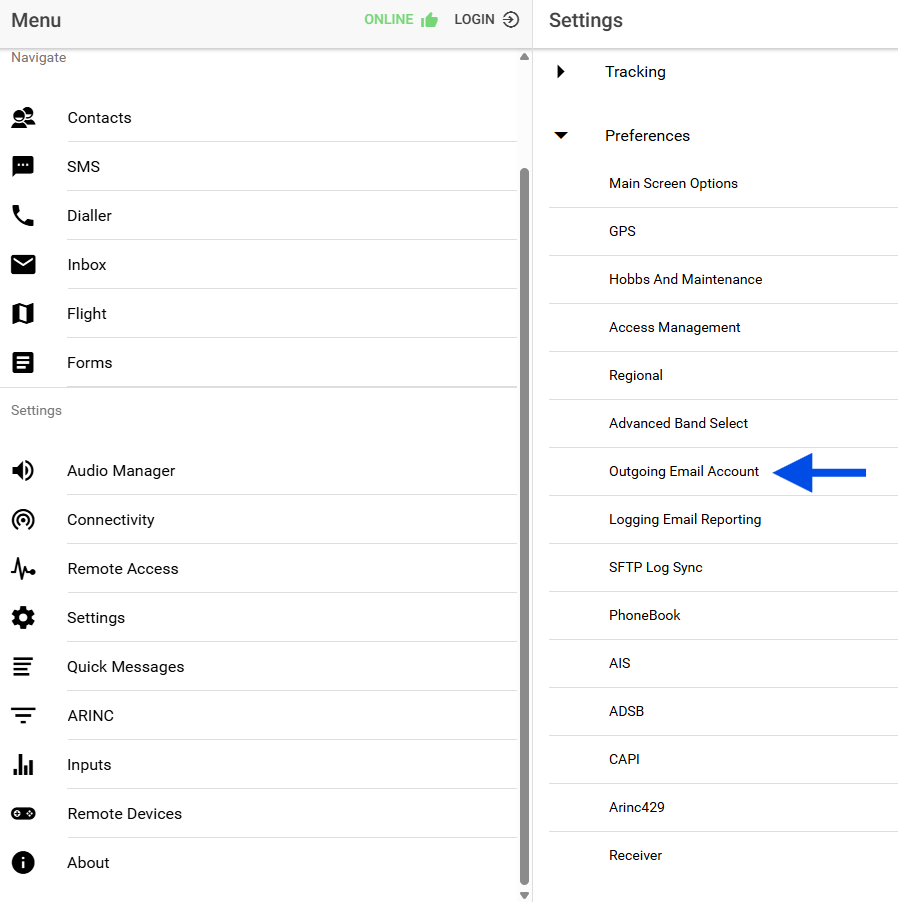
- Access the Settings menu and expand the Preferences menu, select the Outgoing Email Account Settings menu
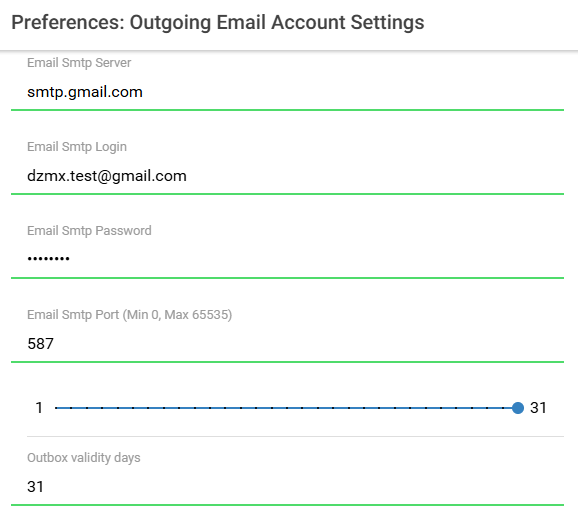
- Enter the following details into the displayed fields:
Settings -> Preferences -> Outoging Email Account
SMTP server = smtp.gmail.com (e.g. for a gmail account)
SMTP login = dzmx.test@gmail.com (replace with your address)
SMTP password = gmail app password
SMTP port = 587
Outbox validity days: 31
- Click “Done”